
SpeedFit™ Design Simulator
Simulate and evaluate the performance of SiC-based power circuits and determine the right SiC device in seconds.
Start a SimulationUnable to run PLECS simulations

I have downloaded the PLECS model and associated reference design from CRD200DA23N-GMA,CRD60DD12N etc
https://www.wolfspeed.com/tools-and-support/power/ltspice-and-plecs-models/
I linked the models to my latest PLECS version 4.9.8 . However any refence iam trying to run I get
"Error in component CRD200DA23N-GMA/Power Stage/FET1 while evaluating parameter Thermal description: File 'CAB5R0A23GM4' was not found in the search path"
I looked at the path and see the file names but looks like the thermal models are missing from wolfspeed download from above path ?
Please help to resolve asap
Comments
-
Thank you for your post, it has been approved and we will respond as soon as possible.
0 -
Hello mavern1,
The Wolfspeed PLECS models zip folder now includes new "MOSFETs with Diode" models to better support some of our customers. Adding these models changed the zip folder structure slightly, which seems to be causing your issue. I provided instructions below on updating the variable file path variables to properly point to the model. These steps assume that you have already linked the downloaded PLECS thermal models, which it sounds like you have done this already.
- Open the relevant PLECS simulation
- Navigate to "Simulation" > "Simulation parameters…" > "Initialization" Tab
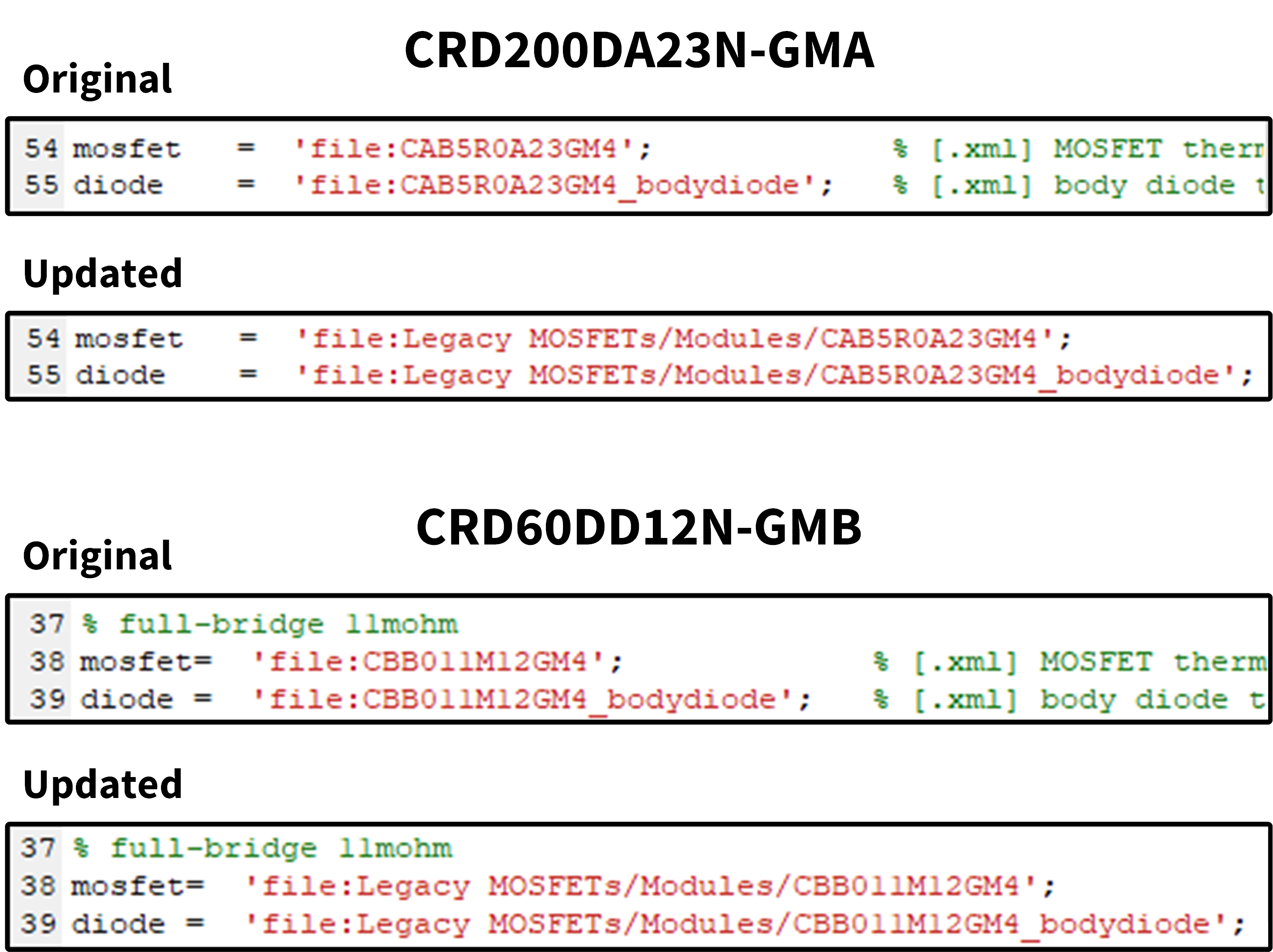
- Modify the variables "mosfet" and "diode" to include their extended file paths
In the CRD200DA23N-GMA simulation, the variables "mosfet" and "diode" are lines 54 and 55, respectively, and in the CRD60DD12N-GMB simulation, they are lines 38 and 39. I provided examples of the updates below which show that I added "Legacy MOSFETs/Modules/" to the file paths. Please note, the exact file path may differ slightly in your simulation depending on which folder was added in the "Thermal description search path" section of "PLECS Preferences". You should be able to change the "mosfet" and "diode" parameters to meet your needs following the above steps.
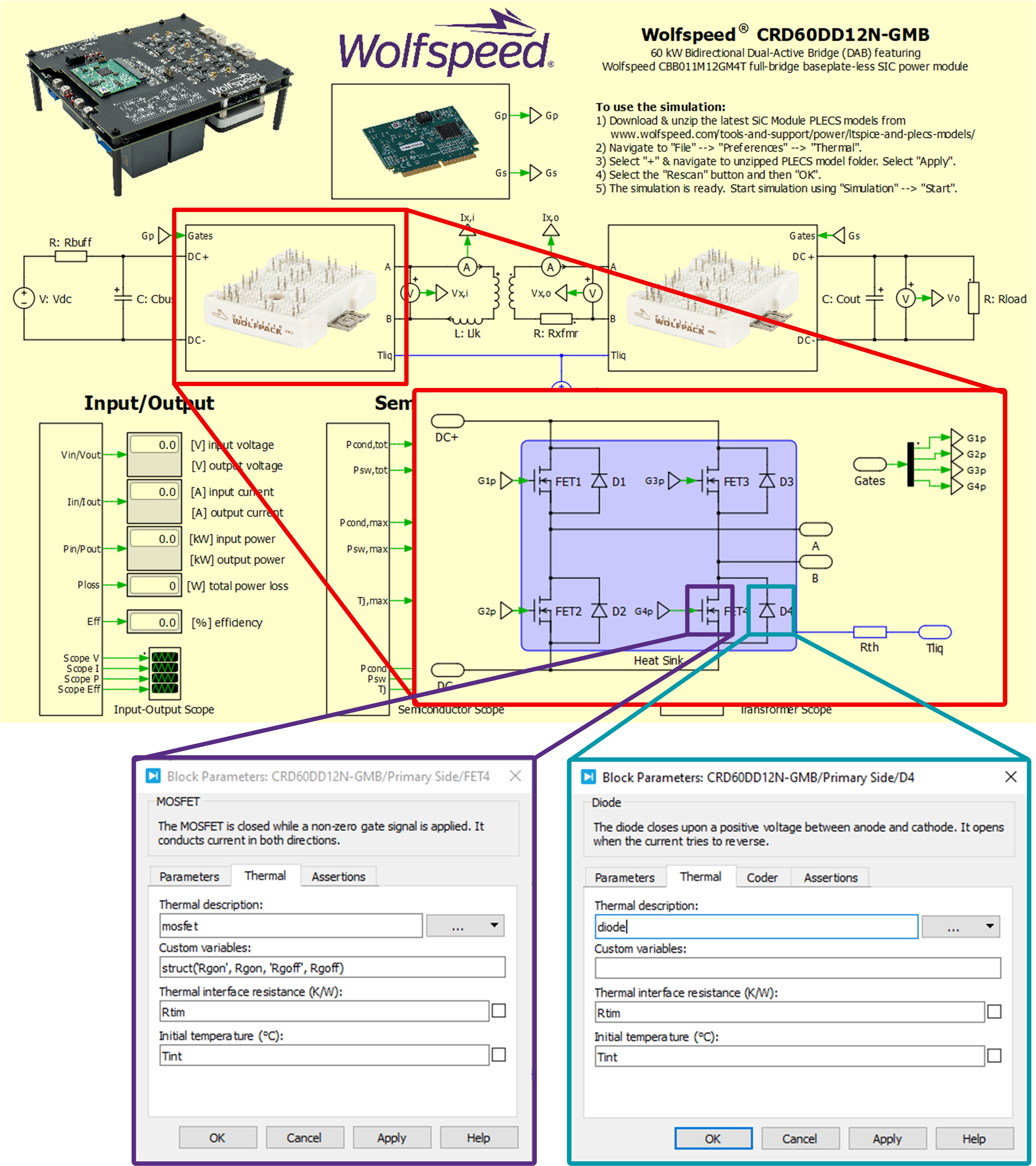
While validating this solution, I found a hard-coded error in the CRD60DD12N-GMB simulation that would prevent this fix from completely solving your issue. To fix this issue, follow the steps below. I also provided a picture of the implemented changes below. This only applied to the CRD60DD12N-GMB. I will work on getting an updated simulation file published to the web that addresses these issues.
- Right-click the primary-side full-bridge subsystem and select "Subsystem" > "Unprotect"; this step is not necessary if the model already says "Protect" instead of "Unprotect"
- Double-click the primary-side full-bridge subsystem to open the model
- Double-click FET4 to open its Block Parameters
- Navigate to the "Thermal" tab
- Click the "…" dropdown button under "Thermal description:" and choose "By reference"
- Type "mosfet" into the "Thermal description:" field; note that it is case sensitive
- Click "OK" to accept the changes
- Double-click D4 to open its Block Parameters
- Navigate to the "Thermal" tab
- Click the "…" dropdown button under "Thermal description:" and choose "By reference"
- Type "diode" into the "Thermal description:" field; note that it is case sensitive
- Click "OK" to accept the changes
Update Variables:
CRD60DD12N-GMB Hard-Coded Issue Correction:
Thanks,
Chris N.
0 -
Thanks for a clear and quick update , all set !!!
0 -
Hello mavern1,
I'm glad that helped! I will close this discussion for now but if you have a follow up question, please "Start a New Discussion" and we would be glad to support you further.
Thanks,
Chris N.
0